.png?width=220&height=110&name=Copy%20of%20Digital%20Chew%20(Blog%20Banner).png)
Step 1: Go to Your Talent Roster
- Log in to your Project Casting account.
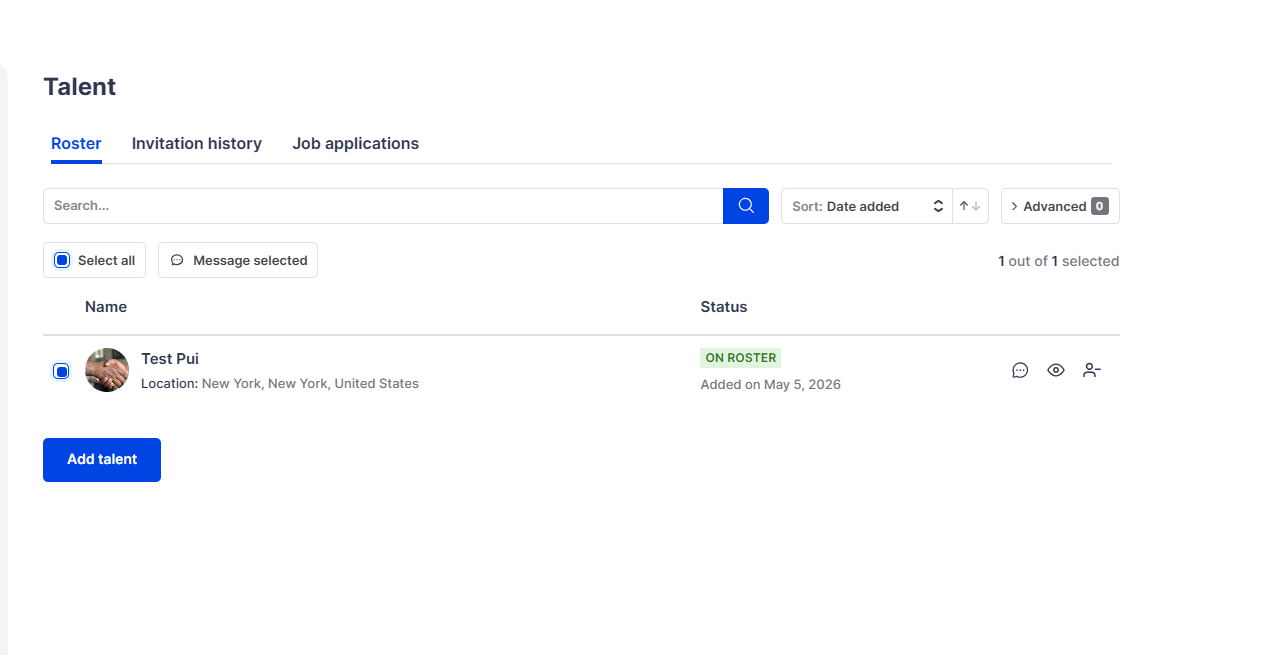
- Navigate to “Talent roster” from your dashboard.
Step 2: Message a Specific Talent
- Locate the talent you want to contact.
- Click the message icon next to their profile.
- Write your message and send it.
Step 3: Message Multiple Talents
- Select one or more talents using the checkbox next to their names.
- To select everyone, click “Select all.”
- Click “Message selected.”
- Enter your message and send it to all selected talents.
Tips
• Use bulk messaging to quickly communicate with your entire roster.
• Double-check your selected recipients before sending.
Summary
You can message talent individually or send bulk messages to multiple talents directly from your Talent Roster.