.png?width=220&height=110&name=Copy%20of%20Digital%20Chew%20(Blog%20Banner).png)
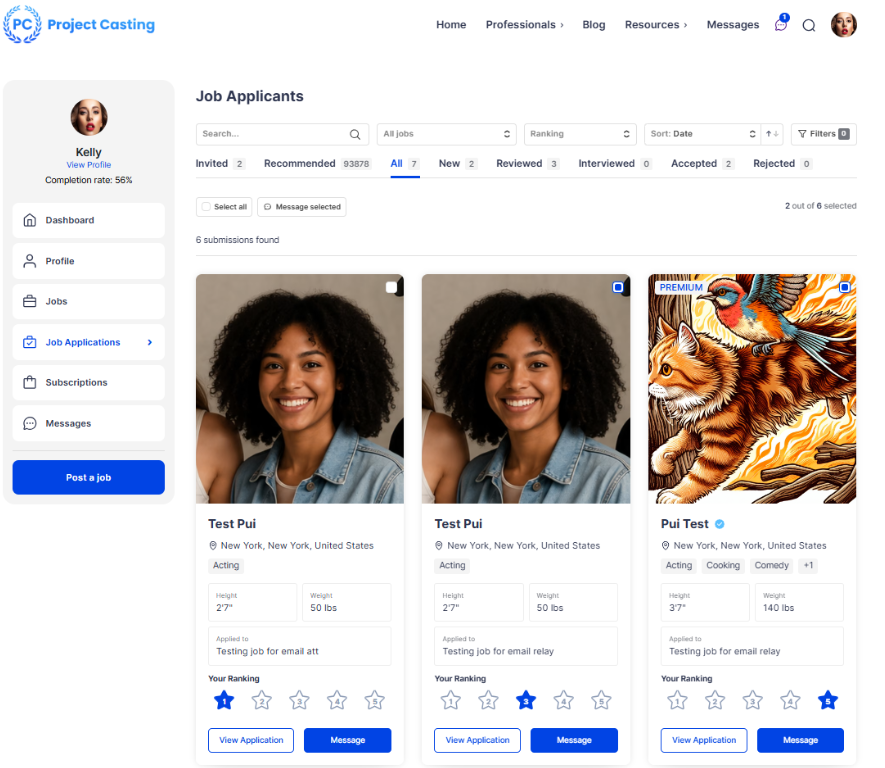
Step 1: Select Multiple Applicants
Go to the Job Applications page and review your applicants.
Each applicant card includes a checkbox in the upper-right corner.
Select the applicants you would like to contact. You can choose multiple applicants at the same time.
Step 2: Click “Message Selected”
Once you have selected your applicants, click the “Message Selected” button above the applicant list.
A messaging window will appear where you can create and send one message to all selected applicants.
Step 3: Choose a Job
Select the job posting associated with your message.
This helps applicants understand which opportunity you are referencing and keeps communication organized across multiple projects.
Step 4: Enter and Send Your Message
Type your message in the message field.
Review your message carefully, then click “Send Message” to deliver it to all selected applicants at once.
Step 5: Manage Conversations
The Messages section provides a centralized inbox where you can view and manage all conversations.
You can organize your inbox by All, Unread, Applicants, or By Job.
These filters make it easier to stay organized and quickly find important conversations.
Step 6: Filter Messages by Job
If you are hiring for multiple projects, you can filter conversations by job posting.
This allows you to view only the messages related to a specific casting call or job listing.
Step 7: Use Emojis and Attachments
Message 2.0 supports emojis and file attachments.
You can attach audition instructions, production documents, images, reference materials, or additional project information directly within a conversation.
Step 8: Receive Message Notifications
When you receive a new message, Project Casting will notify you so you can respond quickly and stay updated.
Tip: Download the Project Casting Mobile App
For the best messaging experience, download the Project Casting mobile app.
You can receive notifications instantly, respond to applicants on the go, and manage conversations directly from your phone.